
Let’s be honest. That ad sales spreadsheet you started? It was simple at first. Now, it’s a chaotic mess of crossed-out dates, confusing color codes, and notes you can’t even decipher anymore. If this hits a little too close to home, you’re definitely not alone. So many creators begin by tracking advertisers in a spreadsheet, only to find themselves buried in manual updates and one tiny mistake away from a major headache.
The Hidden Costs of Spreadsheet Chaos
Here’s a common scenario. You run a popular weekly newsletter with a steady stream of sponsors. It’s Tuesday morning, and you’re getting this week’s issue ready. You pull up your ad spreadsheet and see “GrowthCo” is scheduled for the main slot. Perfect. You grab their creative and pop it into the draft.
A few hours later, an email from another sponsor, “SaaS Solutions,” pops up: “Hey, can we get that preview link?” Your stomach just plummets. You completely forgot they booked that exact same slot three months ago. Now you have to send a painful email to a great, long-term partner, all because your spreadsheet let you down.
Small Errors Create Big Problems
These aren’t just tiny slip-ups; they cause real damage. A single double-booking means an awkward apology, a full refund, and maybe even a lost client for good. Missed placements mean you’re leaving money on the table and earning a reputation for being disorganized.
This manual juggling act eats up hours you should be spending on what you do best, creating amazing content. The low-grade stress of maybe having missed something turns a profitable side of your business into a constant source of anxiety. These hidden costs pile up fast.
- Lost Revenue: Every missed ad or refunded booking is cash straight out of your pocket.
- Damaged Reputation: Double-booking an advertiser looks unprofessional and can scare off future sponsors.
- Wasted Time: You’re spending precious hours fiddling with cells and colors instead of growing your newsletter.
The real problem isn’t the spreadsheet itself. It’s the completely manual process it forces on you. As your newsletter grows, the complexity explodes, making human error almost a certainty. It’s a system that’s actively working against your success.
This is why so many people are moving to more visual planning tools. Research shows that 47.7% of marketers use content calendars to plan their campaigns, highlighting a massive shift toward visual organization. For newsletter creators, this trend points to one clear solution: adopting a calendar view for newsletter ads.
If you’re on Substack, you’re probably already feeling this pain and looking for a better way. Diving into different Substack sponsor tracking tools is the perfect first step to finally ditching that spreadsheet chaos for good.
What Is A Calendar View For Newsletter Ads?
Think about trying to manage a hotel’s bookings using just a running list in a notebook. You’d have no easy way to see which rooms are open tonight, which are booked for next week, or which ones need cleaning. It would be pure chaos.
A calendar view for newsletter ads is the tool that gets you out of that chaos. It’s like upgrading from that messy notebook to a clean, visual booking system for your ad space.
Instead of a line item in a spreadsheet, each ad sponsorship becomes a block on a calendar. You can see your entire month at a glance, instantly understanding what’s sold, what’s available, and what’s coming up. It fundamentally changes your workflow from reactive to strategic.
This isn’t just about plotting dates on a grid. It’s about creating a command center for your entire ad sales operation. In many ways, the visual planning principles are similar to those found in the best social media scheduling tools, which have long proven how effective a calendar-based approach can be.
The Core Components Of An Ad Calendar
A proper ad calendar is way more than a simple grid. It’s an interactive dashboard packed with features designed specifically to make selling and managing newsletter sponsorships feel effortless.
These are the pieces that work together to give you total clarity and control:
- Color-Coded Statuses: Get an instant read on your inventory. You might use green for “Paid & Confirmed,” yellow for “Booked, Awaiting Payment,” and red for “Payment Overdue.” This visual cue tells you exactly where to focus your attention.
- Clickable Ad Slots: Need the details on a specific booking? Just click the calendar block. It should immediately pull up the advertiser’s name, their ad copy and assets, contact info, and the invoice status. No more hunting through emails.
- Multiple Views: Great for both high-level planning and day-to-day execution. You can zoom out to the monthly view to spot long-term openings or zoom in to the weekly view to manage this week’s campaigns.
The core idea is simple: turn time into a visual asset. When you can see your open inventory, you can sell it more effectively. It’s the difference between guessing your availability and knowing it with 100% certainty.
This visual-first approach has become a must-have for anyone juggling a content schedule. It’s no surprise that research shows about one in eight marketers at small businesses struggle with consistent planning without a visual calendar. A dedicated system for your ads solves that exact problem.
By moving to a system built for the job, you go beyond just scheduling. The right newsletter ad management software turns your calendar into the heart of your entire monetization engine, connecting sales and booking directly to payments and fulfillment.
Why a Visual Ad Calendar Will Radically Improve Your Workflow
Switching to a calendar view for your newsletter ads isn’t just about getting organized. It’s a fundamental shift that turns a chaotic, reactive process into a smart, strategic operation. Let’s dig into the real-world benefits you’ll see right away.
Stop Making Expensive Mistakes
The biggest and most immediate win? You’ll eliminate those painful, costly errors that spreadsheets are famous for. We’ve all been there, double-booking a sponsor is a simple mistake that can sour a great relationship in an instant. A visual calendar makes that virtually impossible.
When an ad slot is clearly blocked off, you can’t accidentally promise it to someone else. It’s that simple. This single change protects your hard-earned reputation and saves you from having those awkward refund conversations. You also get a bird’s-eye view of your entire schedule, which means no ad placement ever gets forgotten or missed.
Think of it this way: a calendar turns your ad inventory from a list of dates into a tangible, visual asset. You wouldn’t sell seats on an airplane without a seating chart, right? The same logic applies to your valuable newsletter ad space.
This isn’t just theory. For example, the publisher of “The Daily SaaS,” a niche tech newsletter, ditched their monster spreadsheet for a visual calendar. Within three months, they saw a 100% reduction in booking errors and got back about four hours every week that used to be lost to manual admin work.
Make Your Entire Ad Workflow Smooth as Silk
A good calendar view becomes the command center for your entire ad sales process, saving you a ridiculous amount of time on grunt work. Just think about how you handle things now. From the initial booking to the final invoice, it probably involves jumping between different apps, digging through emails, and setting manual reminders.
A dedicated calendar system pulls everything together. Here’s what that looks like in the real world:
- Booking: An advertiser says “yes” to a date, and you block it off on the calendar in seconds. Done.
- Asset Collection: The calendar event itself becomes the home for their ad copy and images. No more frantic email searches for “that one attachment.”
- Invoicing: The system can be set up to automatically send an invoice via an integration like Stripe the moment a slot is confirmed.
- Fulfillment: When you sit down to write your newsletter, you have one place to look to see exactly which ad runs on which day. No guesswork.
This integrated approach just removes the friction. Instead of juggling a dozen little tasks, you’re following a clean, repeatable process where nothing can fall through the cracks.
Start Selling Your Ad Space Like a Pro
Finally, a visual calendar lets you be truly strategic about selling your sponsorships. When you can see your available inventory laid out for months to come, you can start forecasting with confidence. You can easily spot high-demand periods, like the run-up to Black Friday, and adjust your pricing to match.
This kind of forward-thinking is what separates the hobbyists from the pros. And it matters more than ever. The global digital advertising market is projected to hit $843 billion by 2025, with display advertising leading the charge. In a market that big, you need the right tools to claim your piece. A simple calendar view is a surprisingly powerful way to align your ad sales with major trends and make sure you’re getting paid what you’re worth. You can dive deeper into these digital marketing statistics and insights to see the bigger picture.
Practical Workflows for Your Newsletter Calendar
A calendar view for your newsletter ads isn’t just a neat idea; its real worth shines through in your daily grind. How you actually use it will depend entirely on your publishing rhythm. Let’s walk through how different newsletters can turn this visual tool into an absolute workhorse for managing sponsorships.
Each of these workflows shows how a simple calendar can take a chaotic process and make it repeatable and professional. When you can see everything at a glance, you stop making costly mistakes, save a ton of time, and ultimately, make more money.
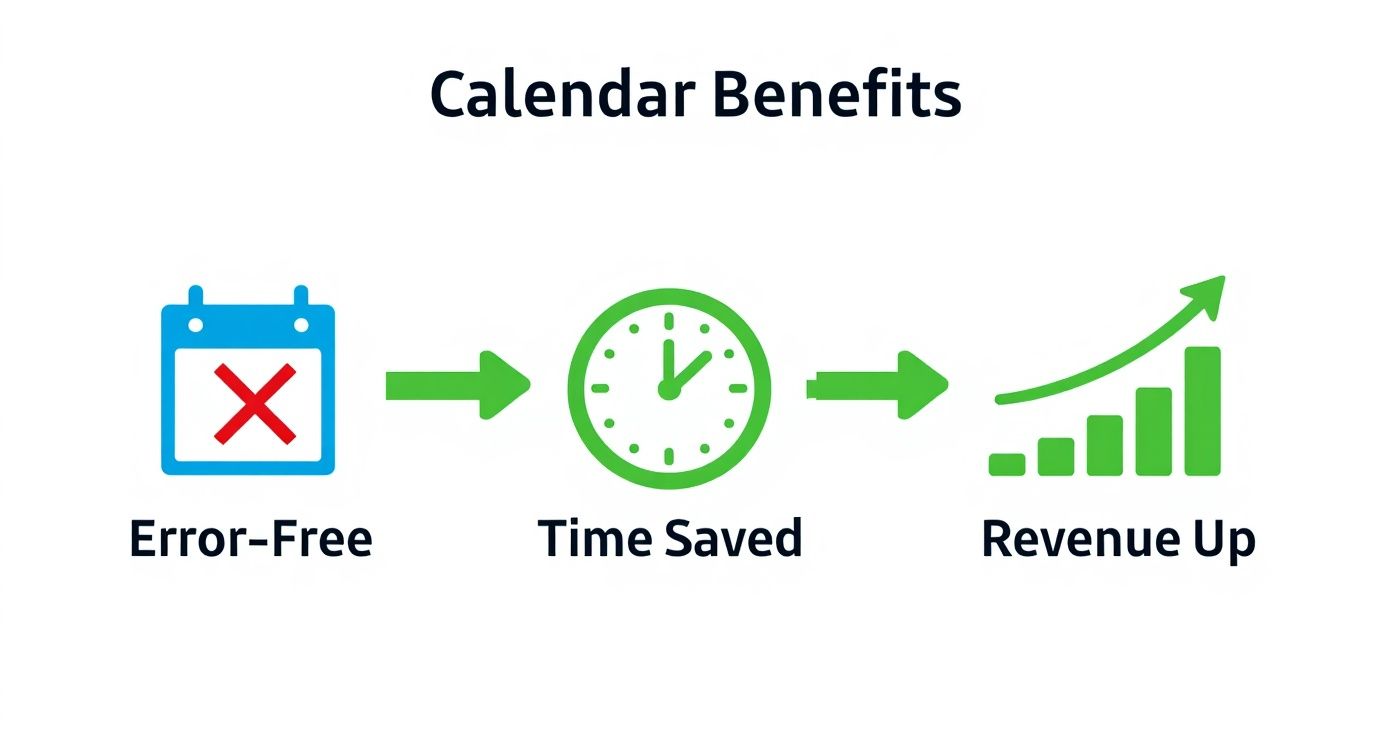
This simple flow really hits home the core benefits. A visual calendar helps you catch and prevent errors, which frees up valuable admin time and, in the end, leads to more revenue in your pocket.
The Daily Newsletter Juggling Act
If you run a daily newsletter, you know it’s a constant race against the clock. Every minute is precious. So, imagine a last-minute sponsor inquiry lands in your inbox for tomorrow’s edition. Without a calendar, you’d be frantically digging through old emails and spreadsheets to see if you even have a spot open, a process that’s just begging for a mistake.
With a calendar view, the whole thing becomes clean and quick:
- Check Availability Instantly: You just glance at the calendar and see the “Sponsored Link” slot for tomorrow is wide open.
- Book and Invoice: With one click on the slot, you pop in the sponsor’s details, and an automated invoice is fired off immediately.
- Collect Assets: The calendar entry now shows a “Pending Assets” status. You send the advertiser a link where they can upload their creative materials directly.
- Confirm and Publish: Once they upload their assets, the status flips to green. You just grab the creative from the calendar event and drop it right into your draft.
This entire dance takes minutes, not hours. For anyone looking to build a solid foundation for their content planning, this comprehensive guide on creating a content calendar has some great principles that apply here, too.
The Weekly Newsletter and Its Waitlist
Weekly publications often have their popular dates booked months ahead of time. You might sell out your main sponsorship slots for an entire quarter. But what happens when a new, high-value advertiser wants a date that’s already taken? This is where a waitlist feature tied directly to your calendar becomes a lifesaver.
This screenshot shows a clear, color-coded calendar where each block is a sponsorship. It makes seeing what’s booked and what’s available completely intuitive.
If an advertiser who booked a prime date cancels, you simply change that slot’s status back to “Available.” The system can then automatically ping the advertisers on the waitlist for that specific week, turning a potential loss into a quick sale. This also takes the headache out of the money side of things; our guide on https://adslots.co/automated-payment-tracking-for-newsletters/ digs into how this can cut down your admin work even more.
The Monthly Newsletter Selling Packages
Monthly newsletters are often in the business of selling multi-issue sponsorship packages, like a three-month “Presenting Sponsor” bundle. Trying to keep track of these complex, long-term campaigns in a spreadsheet is a recipe for disaster.
A calendar view makes managing multi-issue campaigns simple. You can create a recurring event for the sponsor that blocks off the main ad slot for the first issue of each month. This visual reminder ensures you never forget a placement in a long-term deal.
This workflow is also incredibly powerful for forecasting. With your big, long-term packages visually blocked out on the calendar, you can see exactly which smaller, secondary ad slots are still open around them. This lets you sell your remaining inventory with total confidence, helping you squeeze every bit of revenue out of every single issue you publish.
Connecting Your Calendar to Other Essential Tools
A great calendar view for newsletter ads shouldn’t be an island. Its real power comes alive when it’s connected to the other tools you already use to run your business. These connections transform your calendar from a simple scheduling grid into a true command center for your ad sales.
Think of it like an orchestra conductor. The calendar doesn’t play every instrument itself, but it ensures your email platform, payment processor, and other tools are all working in perfect harmony.
Sync Your Calendar with Your Email Platform
The first and most important connection to make is with your email service provider, whether you’re on Beehiiv or Substack. When these systems talk to each other, a ton of manual work just disappears.
For instance, when you mark an ad slot as “confirmed” in your calendar, it can automatically fire off a confirmation email to the sponsor. That small touch makes your operation feel polished and professional. It also cuts down on human error, making sure those confirmations always go out on time.
Connect to Payment Software for Faster Payouts
Another game-changer is hooking up your calendar to payment software like Stripe. Linking your ad schedule directly to your payment system is the fastest way to get paid and completely removes those awkward “just following up on this invoice” emails from your life.
Here’s what that smooth payment workflow looks like:
- Book the Ad: You lock in a sponsor for a specific date in your ad calendar.
- Trigger the Invoice: The second you save that booking, the integration automatically creates and sends a Stripe invoice to the advertiser. No extra steps.
- Track Payment Status: The calendar slot can then update its status from “Booked” to “Paid” as soon as the invoice is settled.
This level of automation means you get paid faster with practically zero manual effort. It turns ad sales from a clunky, multi-step chore into a single, fluid action.
This is a massive win for busy creators. It’s actually surprising how much time you get back by automating simple planning tasks. One survey found that about one in nine marketers struggle with finding the time to create content, and automation hits that problem head-on. By building a system where your tools communicate, you can learn more about how a Stripe integration for newsletter ads helps you spend more time writing and less time chasing payments.
Answering Your Top Questions About Ad Calendars
Moving away from a spreadsheet you know inside and out can feel like a big leap. It’s smart to have questions. Adopting a new tool is a major step for your business, so let’s walk through some of the most common things creators ask about using a calendar view for their newsletter ads.
My goal here is to give you all the info you need to feel great about making this switch.
Can I Just Use Google Calendar for My Ads?
It’s a fair question, and honestly, a tempting one. On the surface, it seems like a free and simple fix. And while you can definitely block out dates on a Google Calendar, you’ll quickly run into its limitations. A standard calendar just isn’t built to handle the nitty-gritty details of ad sales. Things like advertiser info, creative assets, payment status, and performance tracking all tied to a single booking are not part of its core function.
Think of it like this: you could use a butter knife to tighten a screw. It might work, eventually, but a screwdriver is built for the job. It’s faster, safer, and you get a much better result. A dedicated ad calendar does more than just show dates; it prevents double-booking and gives you a clear, at-a-glance dashboard of your entire ad business.
What Features Should I Look For?
The best ad management tools are so much more than a simple grid of dates. You want to look for features that transform a calendar into a genuine command center for your ad operations.
A great ad calendar should give you:
- Customizable Ad Slots: You need the ability to create and label different types of ad placements, like “Main Sponsor,” “Classified,” or “Sponsored Link.”
- Color-Coded Statuses: Visual cues are everything. Seeing “Booked,” “Pending,” “Paid,” or “Assets Needed” in different colors gives you an instant read on your entire workflow.
- Direct Integrations: This is non-negotiable. Connections to your email service provider and payment platforms like Stripe are what make the system truly work for you.
- Centralized Asset Management: Imagine a world where you can store an advertiser’s copy, logo, and tracking links right inside the calendar event. That’s the goal.
Ultimately, you’re looking for a single source of truth where you can manage the whole sales cycle, from that first inquiry to the final invoice, without ever leaving the platform.
How Does a Calendar Help with Rescheduling?
Ah, the inevitable “Can we move our date?” email. This is where a calendar view for newsletter ads really proves its worth. When a client asks to shift their ad placement, a purpose-built tool makes it practically effortless. Most platforms let you just drag and drop a booked ad from one date to another open one.
In seconds, you can see all your available future slots and offer the sponsor clear, professional options. Some tools even have waitlist features. If a booked ad slot suddenly opens up, the system can automatically ping other advertisers who wanted that date. It turns what could be a frantic scramble into a smooth, simple process.
Is It Worth It for a Small Newsletter?
Absolutely. In fact, it might be more important for a smaller, growing newsletter. Even if you’re only selling a few sponsorships a month, setting up a professional and scalable workflow from the very beginning is a massive advantage. It saves you from the future nightmare of migrating off a messy spreadsheet once your newsletter really starts to grow.
Using a proper system from the get-go makes you look more organized and reliable to sponsors, which helps you command better rates. But more importantly, it frees up your time. You get to focus on creating amazing content for your readers instead of getting lost in administrative quicksand.
Ready to ditch the spreadsheet chaos and get hours of your week back? Ad Slots automates your entire ad management workflow, from booking to invoicing, so you can focus on what you do best. Check out Ad Slots and see how easy it can be.