
Managing newsletter sponsorships can quickly turn chaotic. Many creators find themselves staring at a spreadsheet, a tangled mess of sponsor names, run dates, payment statuses, and follow-up notes. This manual system isn't just a headache; it’s a liability. When things slip through the cracks, it costs you money and burns bridges with sponsors.
As your newsletter grows, that trusty old spreadsheet starts to fall apart. You accidentally double-book a premium slot, leading to an awkward apology and a lost opportunity. An ad gets forgotten, damaging a relationship with a great sponsor. You end up spending more time chasing down invoices than you do creating content.
It’s a nightmare.
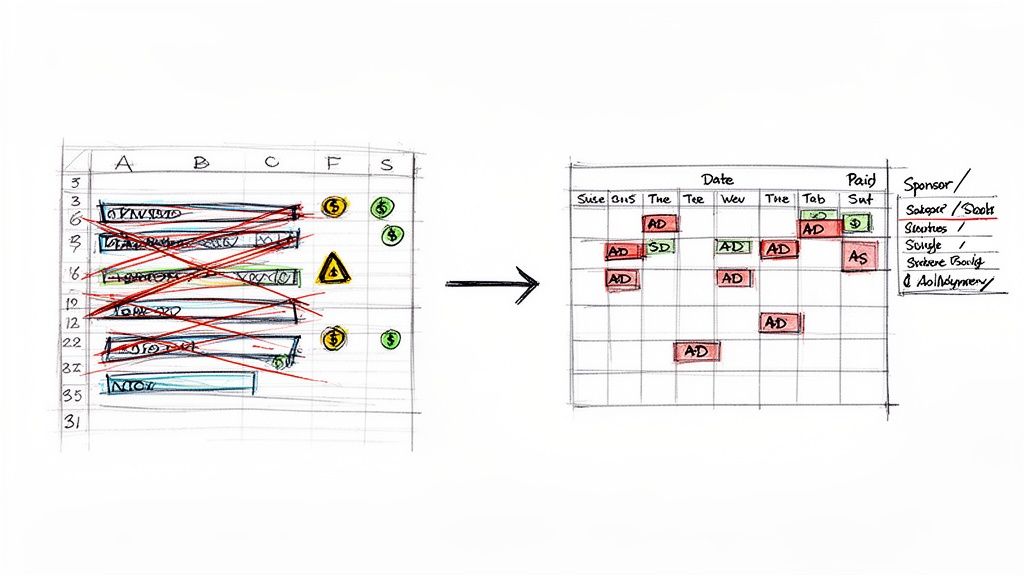
Why Spreadsheets Are Holding You Back
The fundamental problem is that spreadsheets were built for static data, not for managing the moving parts of an ad business. It’s the same reason people move on from generic tools in other areas. Check out the debate of spreadsheets vs. timesheet apps for a parallel. A purpose-built solution will always outperform a generic one.
Trying to run ad sales from a spreadsheet introduces friction at every single step:
- Human Error is Guaranteed: It is way too easy to mistype a date, paste over crucial info, or mark an unpaid invoice as "Paid." These small mistakes have big consequences.
- Zero Real-Time Visibility: A spreadsheet can't ping you when an ad deadline is approaching or flag an overdue payment. You have to manually hunt for problems.
- It Simply Doesn't Scale: Juggling five sponsors might feel manageable. But try doing that with twenty, and ad admin becomes your full-time job.
- It Creates a Poor Sponsor Experience: The endless email back-and-forth for booking, sending assets, and invoicing looks unprofessional. It creates a ton of work for you and your sponsors.
The Shift to a System-Driven Workflow
In the rapidly growing newsletter world, a sloppy ad operation is a serious weakness. With research from the Reaching C-Suite newsletter showing that their sponsorships generated $20,000 in revenue in just 60 days, leaving that money on the table due to manual errors is just not an option.
The goal here is to stop being reactive, chasing down details and putting out fires, and start being proactive. A solid system handles the process, freeing you up to focus on what actually matters: writing great content and building strong sponsor relationships.
Switching from a spreadsheet to an automated system is a game-changer. Let's look at the practical differences.
Spreadsheet Tracking vs Automated System
| Feature | Manual Spreadsheet Method | Automated System (like AdSlots) |
|---|---|---|
| Booking & Availability | Manually checking dates, emailing back and forth, and updating the sheet. | Sponsors see real-time availability on a public booking page and book instantly. |
| Error Risk | High. Double-bookings and incorrect data entry are common. | Extremely low. The system automatically blocks off booked slots. |
| Time Investment | Hours per week spent on data entry, follow-ups, and admin. | Minutes per week. The system handles booking, reminders, and invoicing. |
| Payment Tracking | Manually sending invoices and chasing late payments via email. | Automated invoicing and payment reminders. Tracks status automatically. |
| Sponsor Experience | Clunky and slow, requiring multiple emails for simple tasks. | Professional and seamless. Sponsors can book and pay in one go. |
| Scalability | Poor. Becomes unmanageable as your sponsor list grows. | Excellent. Easily handles dozens or hundreds of sponsors without extra effort. |
Moving to a system designed for this specific job isn't just about saving time; it's about building a more professional, reliable, and profitable business.
This guide will walk you through setting up that modern, system-based approach. We'll cover how a proper newsletter sponsor CRM helps you build a clear ad inventory, use a calendar as your command center, and automate the tedious tasks that are slowing you down. It's how you reclaim your time and truly scale your revenue.
Building Your Simple Ad Sales Foundation
If you want to schedule newsletter ads without pulling your hair out, you need a simple, repeatable system for selling them. Without a solid foundation, you will be stuck in your inbox, answering the same questions and chasing down basic info from every single advertiser. The real goal is to build a process that makes buying an ad from you feel easy, predictable, and professional.
It all starts with defining what you're actually selling. Think of your ad inventory as the complete menu of sponsorship slots available in your newsletter. Instead of cooking up a custom deal for every potential sponsor, standardize your offerings. This makes life easier for everyone.
Think about what really fits your newsletter's format and what your audience will respond to. Most newsletters find success by starting with a few simple, proven ad types.
Define Your Ad Slots and Rates
The very first step is to create a clear menu of your ad options. For a standard weekly newsletter, this usually means a few distinct slots, each with its own purpose and price tag.
For a practical example, let's look at the popular newsletter TLDR. They offer a "Primary Sponsorship" at the top for maximum visibility and "Company Sponsorship" slots further down for brands on a smaller budget. This tiered structure works well.
Here’s a practical example you could implement:
- Main Sponsor: This is your premium spot, usually right at the top. It gets an image, a headline, and a few sentences of text. Price: $500.
- Featured Link: A simple text-only link with a short description, tucked into the middle of your content. This is perfect for sponsors with smaller budgets. Price: $150.
- Classified Ad: Just a single line of text at the very bottom, great for things like job postings or community announcements. Price: $50.
Having tiered options like these opens the door to a wider range of sponsors. It also completely changes the sales conversation. When someone asks about pricing, you have a straightforward, confident answer ready to go.
A well-defined ad inventory removes all the guesswork. Sponsors know exactly what they're buying, and you have a clear framework for your ad revenue, making it way easier to forecast your income.
Create a Simple Booking Form
Nothing kills productivity like endless email back-and-forth. A simple booking form is your secret weapon against this friction. It standardizes the information you collect, making sure you get everything you need from every sponsor in one shot.
Your form doesn't need to be fancy. A free tool like Google Forms or Tally is all you need to ask for the essentials:
- Sponsor's Name and Email
- Company Name and Website
- Which Ad Slot They Want (e.g., Main Sponsor, Featured Link)
- Preferred Send Date(s)
- Ad Copy (Headline, Body Text, URL)
This one form captures every crucial detail right from the start.
Once you have this foundation built, you can reach out to potential sponsors with total confidence. If you need some help with that, these newsletter sponsor outreach email templates are a great place to start. By standardizing your inventory and intake process, you create a smooth, professional experience that keeps sponsors coming back.
Why a Calendar is Your New Best Friend for Ad Fulfillment
If you're still wrestling with spreadsheets to manage your ad inventory, it's time for an intervention. Seriously. For a truly bulletproof ad scheduling system, a visual calendar needs to be your single source of truth.
Think of it as your air traffic control tower. It gives you a clear, visual confirmation of what's scheduled and when, making it almost impossible to have a collision like a double booking.
Once a sponsor gives you the green light, your very first move should be to create an event on a digital calendar. That simple action immediately carves out their spot, turning a verbal "yes" into a rock-solid commitment on your timeline. It pulls the booking out of an abstract spreadsheet row and places it into a visual context you can process in seconds.
This isn't just about preventing screw-ups. A calendar-driven workflow frees up so much mental energy you would otherwise spend just trying to remember who's running when. It's the difference between trying to memorize your grocery list and just, you know, looking at it.
This process is the natural next step after you've laid your ad sales groundwork.
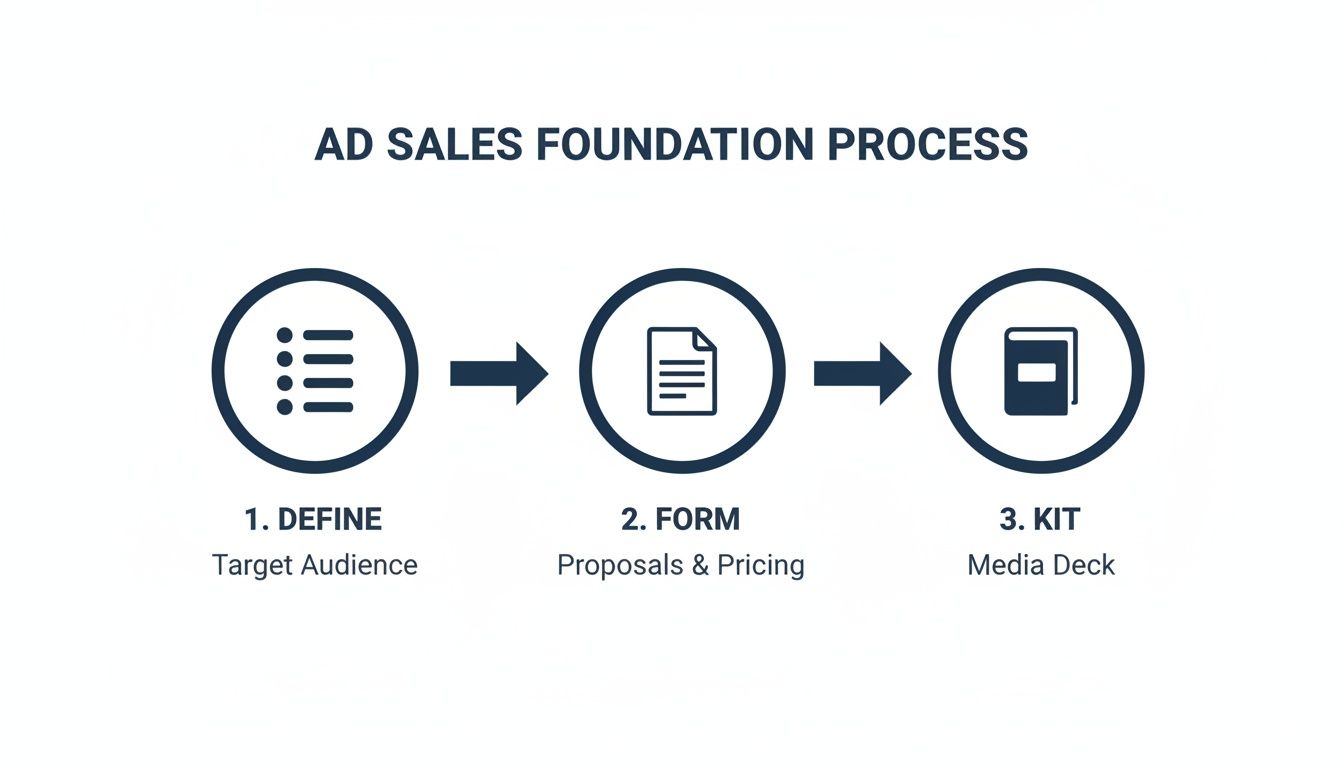
Once you've got your slots defined and a media kit ready, the calendar is what brings it all to life.
How to Build the Perfect Calendar Event
Each entry on your calendar should not just be a placeholder; it should be a complete dossier for that specific ad placement. Don't just block out time with the sponsor's name. You want to pack it with all the mission-critical details so you never have to go digging through old email threads again.
Here is what I put in every calendar event description:
- Sponsor Name: Make it obvious, like "Acme Co, Main Sponsorship."
- Ad Copy & Creative: I paste the final headline, body text, and links to any image files right into the event notes.
- Tracking Links: The exact URL the sponsor wants you to use.
- Send Date & Time: The precise moment the ad is scheduled to go live.
This little system creates a self-contained package for every single ad. When it’s time to build your newsletter, you just open that day's calendar event and copy-paste everything you need. No more frantic searches for that one crucial link five minutes before your send time.
Juggling Multiple Newsletters Without the Headache
Okay, let's say you're running three different newsletters: a daily tech brief, a weekly marketing deep-dive, and a monthly personal finance guide. Trying to manage that with a spreadsheet is a straight-up recipe for disaster. But a centralized calendar makes it totally manageable.
The trick is to color-code each newsletter. Suddenly, you can see your entire ad inventory across all your properties in one clean view. A quick glance tells you the tech brief has a spot open on Wednesday, but the marketing newsletter is booked solid for the next two weeks. That kind of visual clarity is something a spreadsheet can never offer.
This approach gives you an immediate and clear picture of your inventory and commitments.
With 361.6 billion emails flying around the internet daily, a mistimed or double-booked ad is a wasted investment that gets buried instantly. This reliability is everything as the newsletter space gets more crowded.
The core principle is simple: if it's not on the calendar, it's not confirmed. This one rule eliminates all ambiguity and forces a disciplined workflow that protects both your revenue and your reputation.
To see what this looks like in the real world, check out this calendar view for newsletter ads example. Once you see it in action, the benefits become incredibly obvious.
Automating Invoices to Get Paid on Time
Let's be honest: chasing payments is the worst part of selling newsletter ads. It's a huge time sink, creates awkward "just following up" emails, and messes with your cash flow. You can sidestep this entire headache by building a system that gets you paid automatically.
The key is to link your booking process directly to a payment processor. As soon as a sponsor confirms an ad slot, your system should fire off an invoice instantly. This one move gets rid of manual data entry and makes sure every single booking is invoiced correctly and on time.
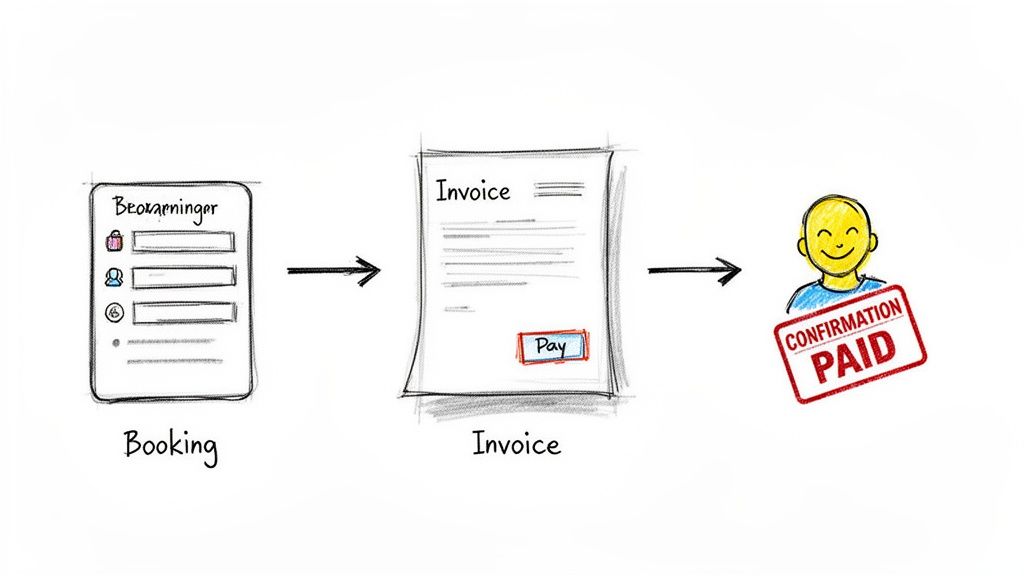
This kind of professional workflow also makes a great impression. Sponsors love a clean, simple process where they can just click a button and pay with a credit card, rather than waiting around for you to create and email an invoice manually.
Set Clear Payment Terms Upfront
Your entire ad sales process needs to be built on clear expectations. The single most important rule you can establish is requiring payment to officially lock in a date. It’s a simple policy that protects you from last-minute cancellations that leave you scrambling to fill an empty spot.
Make your terms crystal clear on your booking page and in your media kit. Here are a few ways to phrase it:
- "Payment is required in full to confirm your ad reservation."
- "Ad slots are reserved on a first-paid, first-served basis."
- "To secure your selected date, invoices are due upon receipt."
This isn't about being difficult; it's about being professional. It frames the ad booking as a clear transaction, not an open-ended conversation. It also weeds out sponsors who are just "window shopping" and saves you from chasing down people who aren't ready to commit.
By making payment a prerequisite for booking, you eliminate nearly all collection issues before they even start. Your cash flow becomes predictable, and your ad inventory is protected from last-minute cancellations.
Make Paying Incredibly Simple
The final piece of this puzzle is making the payment process itself completely frictionless. When your system sends that automated confirmation email, it absolutely must include a direct "Pay Now" link.
With a tool like Stripe or PayPal, sponsors can settle the invoice in a few seconds with their credit card. No back-and-forth required.
If you want to dive deeper into the tools for this, you can explore different types of automated newsletter invoice software. For those of us lucky enough to have repeat sponsors, looking into the best recurring billing software can make things even easier.
When you automate this whole financial workflow, you get paid faster, slash your admin time, and give sponsors a seamless experience that makes them want to book with you again.
Advanced Tactics for Scaling Your Ad Revenue
Once you've got your core ad scheduling system humming along, it's time to get a little more sophisticated and really ramp up your revenue. These next few strategies are perfect for creators who are juggling multiple newsletters or a high volume of sponsors. This is where you shift from just managing ads to actively optimizing them for maximum profit.
The first move is to think beyond the simple flat-rate sponsorship. What if you could personalize the ads your subscribers see? Instead of a one-size-fits-all approach, you can segment your audience based on things like their interests, where they live, or how they've interacted with your content before. A solid scheduling system is what makes this kind of targeting possible without losing your mind.
Let's say you run a newsletter about remote work. You could set it up to show an ad for a new productivity app only to the subscribers who have clicked on similar tool recommendations in the past. That ad is suddenly way more relevant, which means better click-through rates and, ultimately, more valuable ad slots for you to sell.
Introduce Performance-Based Ad Models
Flat fees are safe and predictable, but if you really want to unlock new revenue, it's time to explore performance-based models. This is where you tie the ad cost directly to the results it generates. Data-savvy sponsors absolutely love this.
A couple of popular performance models are:
- Cost Per Click (CPC): The sponsor pays you for every single click their ad gets. It requires good tracking on your end, but it's a direct reward for sending them engaged traffic.
- Cost Per Acquisition (CPA): Here, sponsors pay you a commission for every sale or sign-up that comes from your newsletter. This model perfectly aligns your success with the sponsor's goals.
Trying to manage this manually would be a nightmare. An automated system is pretty much non-negotiable here. It can track the clicks and conversions for you, letting you offer these deals without getting buried in spreadsheets.
Use Data to Optimize Send Times and Ad Placement
Let's talk about timing. Interactive ads are becoming more common, and your ability to schedule and manage these more complex formats can give you a serious edge. We know from industry data that mid-week ad slots can lift open rates by 19-23%, which is a golden opportunity for your sponsors. A good system also helps you filter out junk like bot clicks, which can mess up your metrics and damage a sponsor's trust. You can find more great email marketing insights over on Litmus.
By looking at your own historical data, you can see when your audience is most likely to open and click. Scheduling sponsored content to land in their inbox during those peak windows is a simple tweak that can massively boost an ad's performance.
This is getting even easier with AI-powered marketing tools. They can crunch the numbers for you and recommend the best send times for different segments of your audience, making sure your sponsors get the most bang for their buck. This data-driven thinking turns scheduling from a simple chore into a powerful tool for growing your business smarter, not just harder.
Common Questions About Scheduling Newsletter Ads
Getting a new system off the ground always surfaces a few "what if" scenarios. As you figure out how to schedule your newsletter ads, you want to be sure you're building a process that can handle the curveballs sponsors will inevitably throw your way.
Let's walk through some of the most common questions I hear from creators.
How Far in Advance Should I Book Sponsors?
For a weekly newsletter, the sweet spot is booking sponsors four to six weeks out. This gives you a predictable revenue pipeline and gives advertisers plenty of breathing room to get their creative assets sorted. If you're publishing daily, that window naturally shrinks to about two to four weeks.
A public-facing booking calendar is your best friend here. It shows your real-time availability, which creates a natural sense of urgency. Sponsors can see what's open and snag their preferred dates without a single back-and-forth email. It’s a game-changer.
By setting a clear booking window, you establish a professional rhythm. Sponsors learn to plan ahead, and you get the stability of knowing what your income looks like next month, which helps you ditch the last-minute scramble for good.
What if a Sponsor Misses an Ad Copy Deadline?
Ah, the classic. This is probably the most common headache, but a good system can prevent most of the drama. First off, your confirmation email needs to be crystal clear about the deadline. A simple, bold line like, "Final ad creative is due 72 hours before the scheduled send date," leaves no room for confusion.
Next, your workflow should trigger an automated reminder email 24 hours before that deadline hits. If they still miss it, your policy needs to be firm and communicated upfront. Some creators will run a generic placeholder ad and offer a make-good slot in a future issue. Others enforce a strict "no refunds for missed deadlines" policy.
The key isn't which policy you choose, but that you have one and you state it clearly from the beginning. No surprises.
Does This System Work for Different Ad Packages?
Absolutely. In fact, a solid scheduling system is even more crucial when you start selling different types of ad packages. The trick is to treat each package as its own unique "ad product" in your setup.
For example, you might offer a few tiers:
- Title Sponsorship: Your premium, top-of-the-newsletter placement.
- Featured Link: A text-based link right in the main body of content.
- Classified Ad: A short text ad in a dedicated section at the bottom.
When an advertiser books a specific package, your calendar event and the automated workflow attached to it should reflect its unique requirements. This ensures you’re delivering exactly what was promised, every single time.
How Can I Handle Last-Minute Ad Sales?
Last-minute sales are pure gold. They let you fill unsold inventory and give your revenue a nice little bump. A calendar-based system makes this process incredibly simple and stress-free.
Because your calendar gives you a real-time, at-a-glance view of your availability, you can confidently offer a discount for an open slot without ever worrying about double-booking. Announce these "flash sales" to your waitlist or on social media.
The workflow is identical to a regular booking. The sponsor books the slot, an automated invoice is sent for immediate payment, and your calendar is instantly updated. It's a simple process that turns a potential loss into found money.
If you're tired of spreadsheet chaos and want to build a professional, automated system for your newsletter, Ad Slots can help. Our platform handles sponsor tracking, automated invoicing, and fulfillment scheduling so you can focus on writing great content. Learn more at https://adslots.co.