
Hoping your ads are working is not a strategy. For niche newsletter creators, proper ad tracking separates guesswork from growth. It is how you move from assuming your sponsors are getting value to proving it with hard numbers. This process justifies your rates and builds a sustainable business.
Why Smart Ad Tracking Is Non-Negotiable

The newsletter world is no longer a small pond. It is a booming economy where advertisers pay a premium for direct access to dedicated audiences. We see massive growth across the board. For instance, publishers on platforms like beehiiv collectively earned over $25 million from ads in a single year. That surge is driven by creators who have cultivated deep trust with their readers.
Without a reliable tracking system, you are flying blind. You cannot definitively prove your newsletter's impact, which makes it incredibly difficult to keep sponsors coming back or confidently raise your rates.
Think about the difference. You could tell a sponsor, "Yeah, I think the ad did pretty well." Or you could show them, "Your ad generated 450 clicks and led to 15 direct conversions." One is a guess; the other is a business case.
Moving Beyond Basic Metrics
So many creators get hung up on vanity metrics like open rates. A high open rate is a great sign of a healthy list, but it does not tell a sponsor what they really care about. Did their investment pay off? As you can learn in our guide to what makes a good email open rate, this metric is just the tip of the iceberg.
Truly effective tracking zeroes in on metrics that prove tangible value.
- Click-Through Rate (CTR): This shows you exactly how many subscribers were interested enough to click the sponsor's link. It is a direct measure of engagement.
- Conversion Rate: This is the gold standard. It tracks the percentage of clicks that turned into a desired action, like a purchase, a demo booking, or a sign-up.
- Cost Per Acquisition (CPA): This metric tells the sponsor precisely how much they paid to acquire each new customer through your newsletter.
Sophisticated advertisers look for this data. They want to see a clear return on their ad spend. When you can provide that data, you immediately stand out.
The real goal of ad tracking is to build a bridge of trust between you and your sponsors. When you provide clear, undeniable data, you transform a one-off transaction into a long-term partnership built on proven results.
At the end of the day, precise tracking helps you speak the same language as your sponsors. It allows you to understand what they value and shows them you're a professional partner. This turns your ad operations from a time-consuming chore into a powerful revenue engine for your publication.
Setting Up KPIs Sponsors Actually Care About
Let's be real. Your open rate, while a decent health check for your list, does not pay a sponsor's bills. They see it as the entry fee, not the main event. What they truly want to know is whether their ad spend with you actually moved the needle for their business.
Many creators get this wrong. They present a report full of opens and maybe a few clicks, but the sponsor is left wondering, "So… did we get any customers from this?"
Your entire tracking setup should be designed to answer that one crucial question. When you can confidently show a sponsor how your newsletter led to sign-ups, demo requests, or sales, you stop being just another ad slot. You become a strategic partner they cannot afford to lose.
The Big Three Metrics on Every Sponsor's Radar
No matter the industry, a few core KPIs almost always make it onto a sponsor's marketing dashboard. These are the numbers that justify their budget and decide whether they come back for another campaign.
- Click-Through Rate (CTR): This is your first proof point. It shows what percentage of your audience was intrigued enough by the ad to actually click the link. A healthy CTR tells a sponsor your recommendation carries weight with your readers.
- Conversion Rate: This is the big one. It measures how many of those clicks turned into a meaningful action, a purchase, a trial sign-up, a downloaded guide. This metric ties your newsletter directly to the sponsor's business goals.
- Cost Per Acquisition (CPA): This is the ultimate efficiency metric. It tells the sponsor exactly what they paid to get a new lead or customer from your newsletter. A low CPA is a massive win and makes renewing the ad buy a no-brainer.
Think of it like this: CTR shows interest, the conversion rate shows action, and CPA shows value. To keep a sponsor long-term, you need to deliver on conversions and prove the value.
Matching Your Metrics to Your Niche
This is where real expertise comes in. The most successful newsletters do not use a one-size-fits-all approach to tracking. They understand that what matters to a B2B software company is completely different from what a direct-to-consumer brand cares about.
Let's break it down with a couple of real-world scenarios.
Scenario A: The B2B Tech Newsletter
Imagine you write a newsletter for software engineers and you partner with a new developer tool. Their main goal is getting qualified leads into their pipeline, not making an immediate sale.
- What they care about most: Demo Sign-ups or Free Trial Starts.
- A good secondary metric: Downloads of a technical whitepaper.
- How you track it: You’ll need to track clicks to their landing page and, ideally, get confirmation from them on form completions. This proves your audience is full of high-intent professionals.
Scenario B: The DTC Wellness Newsletter
Now, picture a newsletter about healthy living that partners with an organic snack brand. Their goal is simple and direct: sell more snacks.
- What they care about most: Direct Sales (Revenue).
- A good secondary metric: Add-to-Carts.
- How you track it: You'll use a unique discount code or specific UTM parameters that plug directly into their Shopify or e-commerce analytics. This gives them a crystal-clear view of the ROI.
This kind of tailored tracking is precisely why niche newsletters are so powerful. Finance, AI, and B2B marketing newsletters can command premium CPM rates, often from $35 to $100, because they deliver a specialized, high-value audience. Their ad engagement is frequently 3 to 4 times higher than what brands see on social media. This makes the ROI undeniable when tracked correctly.
A Quick Look at KPIs for Different Niches
The KPIs you track are a direct reflection of your audience's value. Here is a simple table to show how the "right" KPIs can change depending on the newsletter's focus.
| Essential KPIs for Niche Newsletter Ad Tracking | ||
|---|---|---|
| KPI | What It Measures | Why It Matters to Sponsors |
| Sales Revenue | The total dollar amount of sales generated directly from the ad campaign. | For e-commerce and DTC brands, this is the ultimate measure of ROI. It's pure profit. |
| Lead Generation (MQLs) | The number of Marketing Qualified Leads, like demo requests or contact form fills. | Crucial for B2B SaaS and service companies. It shows the newsletter is filling their sales pipeline. |
| Free Trial Sign-ups | The number of new users who started a free trial of a product or service. | A key metric for subscription software. It proves the audience is highly relevant and interested. |
| Affiliate Link Clicks | The number of clicks on an affiliate link for a product recommendation. | For newsletters monetizing with affiliate marketing, this is the primary indicator of audience trust. |
| Event Registrations | The number of sign-ups for a webinar, conference, or online event. | Essential for sponsors in the events or education space. It shows the newsletter can drive attendance. |
Focusing on these kinds of metrics transforms your reports from a simple summary into a powerful sales tool for your next campaign.
Prove Your Audience is Engaged
Ultimately, all this data is about proving your value. While the context is different, the core principles are the same across platforms. You can get a sense of how others quantify this by looking into resources on understanding engagement rate calculation for social media. The lesson is universal. You have to show that your audience isn't just passively scrolling but is actively leaning in.
By focusing on these bottom-of-the-funnel metrics, you provide undeniable proof that your newsletter works. This is the foundation of all great newsletter advertising best practices.
Building Your Ad Operations Workflow
If your ad management process feels like a chaotic scramble, you're not alone. But a scattered approach is a surefire way to miss revenue and leave sponsors feeling frustrated. The key to moving from amateur to pro is building a solid, repeatable workflow. It turns the chaos into a predictable system, guaranteeing sponsors get what they paid for and you get the data to prove it.
To make this real, let’s imagine we’re running "Sustainable Living Weekly," a newsletter with 15,000 subscribers focused on eco-friendly products. By walking through each step of the process, you can see how to build a system that works for your own publication.
Starting With Smart Ad Booking
The entire tracking process kicks off the moment a sponsor reaches out. Your goal here is to capture all the essential information upfront, which cuts out tons of back-and-forth emails later. This all begins with your ad inquiry form or media kit.
Do not just ask for a name and email. Your form should be a data-gathering powerhouse. For "Sustainable Living Weekly," the booking form would include fields like:
- Company Name & Contact: The basics.
- Desired Ad Dates: So you can check your inventory immediately.
- Primary Campaign Goal: Are they after sales, sign-ups, or just brand awareness? This tells you exactly which KPIs matter to them.
- Landing Page URL: You can't create tracking links without it.
- Unique Discount Code (Optional): This is a simple but incredibly powerful way to track direct sales.
By gathering these details right from the start, you immediately frame the conversation around performance and show sponsors you’re serious about delivering results. It is a simple step that sets the stage for accurate tracking down the road.
Nailing the Fulfillment and Tracking Setup
Once you've booked an ad, it's time to bring your tracking system to life. This is where you put the technical pieces in place to actually measure performance. It sounds more complicated than it is.
Let’s say a sponsor for "Sustainable Living Weekly" wants to promote a new line of bamboo toothbrushes, and their main goal is driving sales. Here is how the fulfillment and setup would look:
- Create a Unique UTM Link: Using a free tool like Google's Campaign URL Builder, take their landing page URL and add specific tracking parameters. The
utm_sourcewould be 'newsletter',utm_mediumis 'email', andutm_campaigncould be something descriptive like 'bamboo-toothbrush-promo-mar25'. This tag tells their analytics exactly where their website traffic came from. - Use a Link Shortener: That long, clunky UTM link looks messy in an email. A service like Bitly or Rebrandly can create a clean, professional-looking link. As a bonus, it gives you an independent layer of click data.
- Confirm Tracking with the Sponsor: Before your newsletter goes live, send the sponsor the final ad copy along with your shiny new tracking link. A quick email asking them to confirm it's working on their end is a crucial step. This simple check can save you from the nightmare of discovering a broken link after the campaign has already run.
The most common point of failure in ad tracking is a simple setup error. Double-checking your UTM parameters and testing the final link takes 60 seconds but can save you from having zero data to report.
This is what sponsors ultimately look for. They want a clear path from the reader's click to a measurable return on their investment.
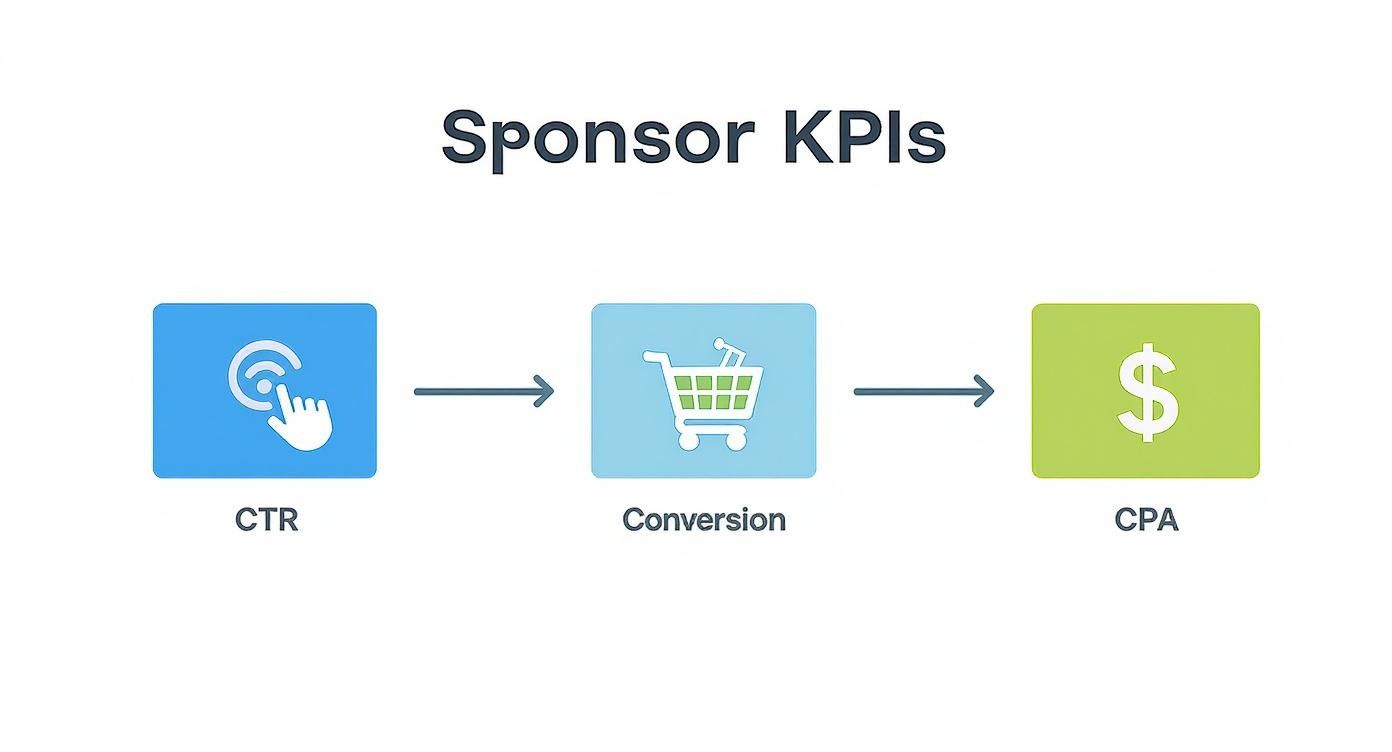
The journey is simple: A reader clicks the ad (CTR), makes a purchase (Conversion), and the sponsor can calculate how much that new customer cost them (CPA). Your job is to provide the data that makes this possible.
Automating Scheduling and Invoicing
Trying to schedule ads manually is a massive time sink and a huge risk. We have all been there, forgetting to run an ad because the confirmation was buried in an old email thread. It damages your reputation and, of course, costs you money.
This is where dedicated tools become an absolute game-changer. Using a platform for newsletter ad scheduling software takes the entire process off your plate. You just plug in the ad details, set the run dates, and the system ensures everything gets placed correctly, every single time.
In the same way, automating your invoicing saves hours of tedious admin work. Once a campaign is finished, the system can automatically generate and send an invoice with all the correct details and payment terms. This helps you get paid on time without having to chase down sponsors, a professional touch that makes brands eager to work with you again.
The Final Steps: Reporting and Reconciliation
Your job is not over when the email goes out. The final, critical phase is all about closing the loop. You need to provide clear data and make sure everything lines up.
Give it about 2-3 days after the campaign runs. This gives subscribers plenty of time to open and click. Then, it's time to pull the performance data. Your report for the bamboo toothbrush sponsor should be clean and simple, including:
- Total Clicks: Pulled directly from your link shortener or ESP.
- Click-Through Rate (CTR): Clicks divided by your total subscriber count.
- Conversion Data (If available): Do not be afraid to ask the sponsor if they can share how many sales or sign-ups the campaign generated.
Present this information in an easy-to-read report. This final step is your proof of value and sets you up perfectly for a renewal. By following a structured workflow from booking to reporting, you're not just selling ads. You are building a reliable, scalable ad operations engine that will power your newsletter's growth.
Choosing the Right Ad Tracking Tools
https://www.youtube.com/embed/eZs-KfVTm14
The moment you decide to ditch a sprawling, messy spreadsheet for a dedicated tool is a huge milestone. It is when you start treating your newsletter's ad operations like a real business, not just a side project. The right tool will not just save you hours of manual busywork. It also brings a level of professionalism and data clarity that sponsors absolutely love.
The good news is you do not have to dive headfirst into a complex, expensive system. The world of newsletter ad tools has options for every stage, from simple link builders to all-in-one management platforms. The key is to find the right fit for your current scale and budget.
Free and Simple Starting Points
Before you even think about spending money, a couple of the most powerful tools are completely free. They are the foundation of any solid tracking system. They are perfect if you're just starting to monetize or are only juggling a sponsor or two each month.
- Google's Campaign URL Builder: This one is non-negotiable. It lets you add specific UTM parameters to your sponsor's link. This is the magic behind showing them exactly how your newsletter traffic performs in their own Google Analytics.
- Link Shorteners (like Bitly): Let's be honest, a long UTM link is ugly and can look a little spammy. A tool like Bitly cleans it up while adding an independent layer of click tracking. This gives you a reliable, third-party number you can confidently report to sponsors.
Using just these two tools together is a massive upgrade from dropping a raw link into your newsletter. You’ll have the basic click data you need to start proving your value.
When to Look at Integrated Platforms
As your newsletter grows, so does the admin headache. Juggling multiple sponsors, different run dates, and a sea of UTM links in a spreadsheet quickly becomes a recipe for mistakes. This is the point where dedicated ad management software becomes a lifesaver.
Some email service providers (ESPs), like beehiiv, offer built-in ad management tools. This can be a fantastic option because everything lives under one roof. You can manage your ad inventory, track clicks, and view performance right next to all your other newsletter metrics.
The real power of an ad management platform isn't just counting clicks. It's about automating the entire workflow—from booking and scheduling to invoicing and reporting—so you can focus on writing great content instead of playing ad ops manager.
This kind of sophisticated tracking is more important than ever. Native advertising in newsletters can achieve click-through rates nearly 9 times higher than old-school display ads. A study by Nielsen Norman Group backs this up, showing that users often ignore traditional banner ads completely. When you can segment your list to personalize outreach, which can boost open rates by up to 26% according to Campaign Monitor, you need a system that can clearly show advertisers the incredible value you’re delivering. You can read more about what makes this approach so effective through these insights on email marketing in newsletters.
A Quick Comparison of Tracking Tools
To help you figure out what you need, let's break down the different types of tools and who they're really built for.
Comparison of Newsletter Ad Tracking Tools
| Tool Type | Examples | Best For | Key Tracking Feature |
|---|---|---|---|
| URL Builders | Google Campaign URL Builder | Every single creator, no matter the size. It's foundational. | Creating UTM-tagged links for clear source attribution. |
| Link Shorteners | Bitly, Rebrandly | Creators who want clean links and independent click counts. | Simple, reliable click tracking and easy link management. |
| Integrated ESP Tools | beehiiv Ad Network | Creators on the platform who want a seamless, all-in-one setup. | Native impression and click tracking inside the ESP dashboard. |
| Dedicated Ad Platforms | AdSlots | Creators managing multiple sponsors and looking for full automation. | End-to-end workflow automation (scheduling, invoicing, reporting). |
Choosing the right external solution is especially critical for creators on platforms like Substack, which do not have many native ad tools. We put together a detailed guide to help you find the perfect fit. Check out our review of Substack sponsor tracking tools.
Migrating From Spreadsheets to a New Tool
Making the switch can feel like a huge project, but it is actually pretty painless with a simple plan.
- Export Your Historical Data: First thing's first, get all your data out of that old spreadsheet. This means past sponsor details, campaign dates, the links you used, and any performance numbers you have. Keep this archive handy; you'll be surprised how often you'll refer back to it.
- Set Up Your New System: Now, take the time to configure your new tool properly. Input your ad slot availability, set up your rate card, and customize your invoicing templates. A little effort here saves a lot of headaches down the road.
- Onboard Your Sponsors: For your very next campaign, start with the new tool from day one. Frame it as a positive change for your sponsors. Let them know you've upgraded your system to provide more reliable tracking and professional reporting. It immediately positions the move as an improvement that benefits them, too.
Creating Sponsor Reports That Prove Your Value
The campaign has wrapped and you've crunched the numbers. Now it is time for the moment of truth. This is what separates one-and-done deals from long-term partnerships. A truly great sponsor report does more than just list metrics. It tells a compelling story about the value you delivered.
Think about it from the sponsor's perspective. They are drowning in data from a dozen different channels. Your report needs to cut right through the noise and answer their one crucial question: "Was this worth it?" When you can show them a clear, undeniable return, your report stops being a summary and becomes your best sales tool for repeat business.
From Data Dump to Compelling Story
One of the biggest mistakes creators make is firing off a quick email with a screenshot of their ESP’s click data. "Here's how it went!" they might say, putting all the work on the sponsor to figure out what it means. A professional report, on the other hand, takes them by the hand and walks them through the campaign’s success.
Your report should be clean, visual, and scannable. It is not a novel. It is an executive summary designed to prove ROI.
Every solid report needs to include at a minimum:
- Campaign Overview: A quick refresher on what you ran, when you ran it, and the goal they told you they had.
- Key Performance Metrics: The big three: total impressions (your subscriber count at send time), total clicks, and the resulting Click-Through Rate (CTR).
- Conversion Data (The Holy Grail): If you tracked sales with a unique discount code or the sponsor shared conversion data, this becomes the star of the show.
- Contextual Analysis: This is where your expertise shines. You do not just report the numbers; you explain what they mean.
Adding Context That Cements Your Value
Raw numbers are just trivia. The real magic happens when you frame those numbers in a way that underscores the win. This is where your niche ad tracking truly pays off, because you’re showing the unique power of your audience.
For example, do not just state that the CTR was 2.5%.
Instead, frame it with context. "The campaign achieved a 2.5% CTR, which is 25% higher than our newsletter's average benchmark of 2.0%. This tells us the offer really resonated with our readers." All of a sudden, a good number becomes an exceptional one.
Another powerful move is to include qualitative feedback. Did a reader hit "reply" and tell you how much they loved the sponsor's product? Screenshot that email (blurring their personal info, of course) and drop it in the report. That kind of social proof is pure gold.
A great report shows what happened. An unforgettable report shows why it happened and why it mattered. It connects the dots between a reader's click and the sponsor's bottom line.
A Sample Report Structure You Can Steal
Here is a simple, effective blueprint for your next performance report. You can build this in a Google Doc or use a tool like Canva to give it some visual polish.
1. Campaign Summary
- Sponsor: EcoBean Coffee
- Run Date: March 25, 2024
- Ad Placement: Main Sponsor Slot
- Goal: Drive sales for their new "Sunrise Blend."
2. Core Performance Metrics
- Impressions (Subscribers): 15,000
- Total Clicks: 375
- Click-Through Rate (CTR): 2.5%
- Conversions (Sales with 'ECOWEEKLY20' code): 18
- Conversion Rate (from Clicks): 4.8%
3. Analysis & Key Takeaways
- The 2.5% CTR outperformed our typical ad benchmark of 2.0%, indicating a very strong interest in the offer.
- The 4.8% conversion rate from click to sale is excellent. This shows that your landing page did a fantastic job of converting the high-intent traffic we sent your way.
4. Next Steps & Recommendations
- Based on this success, we recommend booking a follow-up slot in May to build on this momentum.
For creators who want to take their reporting to the next level, understanding multi-channel attribution models is a game-changer. This approach helps you show a sponsor how your newsletter played a role in their customer's journey, even if it wasn't the very last click before a purchase. Being able to provide that kind of sophisticated insight is how you justify premium rates and lock in those long-term deals.
Common Ad Tracking Questions Answered
Even with the best system in place, you are bound to run into some tricky situations when tracking ads for your newsletter. Let's walk through some of the most common questions and roadblocks I see creators hit, so you can handle them with confidence and keep your sponsors happy.
How Do I Track Conversions Without a Tracking Pixel?
This one comes up all the time, especially when you're working with smaller brands that might not have a tech person on speed dial. If a sponsor tells you they cannot install a tracking pixel, do not panic. You have still got great options for proving your value.
The best workaround? Ask for a dedicated, UTM-tagged landing page. For example, if your newsletter is "The Weekly Gardener," you could ask a seed company for a unique page like sponsor.com/weeklygardener. This gives them a clean way to see all the traffic, and sales, that came directly from your campaign. No pixel needed.
Another fantastic method is the unique discount code. A code like GARDENER20 is incredibly easy for a sponsor to set up. More importantly, it gives you both undeniable proof of how many sales your audience generated. While you do not get the same granular data as a pixel, these methods provide the tangible ROI sponsors are looking for.
When a sponsor can't provide a pixel, see it as an opportunity. By suggesting a dedicated landing page or a unique discount code, you're showing them you're a proactive partner who is serious about delivering measurable results, not just clicks.
What Is a Good Click-Through Rate for a Niche Newsletter?
This is the million-dollar question. The honest answer is: it depends. There is no single number that works for everyone, because a "good" CTR is tied directly to your niche and how engaged your readers are.
That said, for most specialized newsletters, a healthy click-through rate usually lands somewhere between 1% and 5%.
But in a really passionate niche with a loyal audience, it is not uncommon to see that number climb even higher, sometimes topping 8%.
- A B2B marketing newsletter might pull a solid 2% CTR for a new software tool.
- A newsletter for a hobby like knitting could easily hit a 6% CTR for a well-known yarn brand.
The most important thing you can do is figure out your own baseline. Once you have tracked a few campaigns, you will know what a typical CTR looks like for your newsletter. That data is gold when it comes to setting realistic expectations with new sponsors.
Can I Use Google Analytics for Newsletter Tracking?
You absolutely can, and you should. Google Analytics is an incredibly powerful (and free) tool for this, as long as you get comfortable with one thing: UTM parameters.
By building a unique UTM-tagged URL for every ad you run, you make it simple for the sponsor to see exactly how many people clicked from your newsletter to their website. This data shows up right in their Google Analytics under the Acquisition > Campaigns report, clearly labeling your newsletter as the source.
It gets even better if the sponsor has e-commerce or goal tracking set up. They will not just see the clicks you sent over; they will see how many of those clicks turned into actual sales or sign-ups. Offering that level of insight is a pro move that makes you stand out.
How Do I Track a Sponsor With Multiple Ad Slots?
When a sponsor books a package with, say, a top banner and a mid-article link, you need to track each placement separately. This is crucial. It tells you which ad format is working best and gives you valuable data for optimizing future campaigns.
The good news is that it is pretty simple to do. Just create a slightly different UTM-tagged URL for each ad. You can keep most of the parameters the same (like utm_source=newsletter and utm_campaign=spring-promo), but you’ll want to change the utm_content tag to identify the specific ad.
For instance:
- Ad Slot 1 (Top Banner):
utm_content=top-banner-mar25 - Ad Slot 2 (Mid-Article Text Link):
utm_content=text-link-mar25
This tiny tweak lets both you and the sponsor see a performance breakdown for each ad right in your reports. You can clearly show which placement drove more clicks while still providing the total for the whole campaign. That kind of detail shows you’re on top of your game and helps sponsors spend their money more wisely.
Stop letting spreadsheet chaos run your ad operations. AdSlots automates your sponsor tracking, invoicing, and scheduling so you can stop wrestling with manual tasks and focus on what you do best: writing great content. Learn how AdSlots can streamline your newsletter monetization today.